A universal video player sounds simple: render a video, add controls, and make the same component work everywhere. The hard part begins when “everywhere” means two native operating systems, multiple browser media stacks, touch and pointer input, fullscreen, Picture in Picture, captions, adaptive streams, interruptions, and a UI that must remain predictable through all of them.
The way through is not one giant component. It is one product contract backed by two platform engines.
Define universal before writing code
“Cross-platform” should describe consistent behavior, not identical internals. For this player, the shared promise is:
- one source model for files, HLS, and DASH
- one set of playback commands
- one state vocabulary for the interface
- one control layout and accessibility model
- platform-appropriate fullscreen and Picture in Picture behavior
The media engine is allowed to differ. Native platforms can use Expo Video, while the browser uses the HTML <video> element with adaptive-stream adapters where needed. Trying to conceal that distinction usually produces a leaky abstraction with platform checks scattered across the interface.
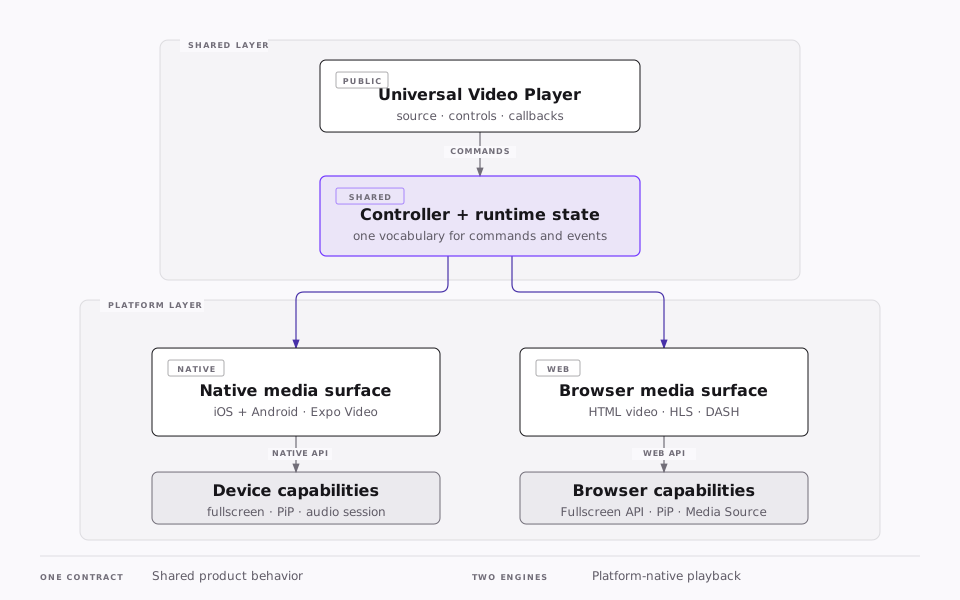
The important boundary is between product behavior and media behavior. The shared layer decides what play, pause, seek, muted, fullscreen, and error mean to the interface. Each surface translates those commands into its platform API and reports facts back.
Start with the smallest useful contract
Keep the public types focused on what the controls need. Do not expose an entire native player or DOM element through the shared component.
export type VideoSource = {
  captions?: Array<{
    label: string;
    language: string;
    uri: string;
  }>;
  poster?: string;
  title: string;
  uri: string;
};

export type PlaybackSnapshot = {
  duration: number;
  error?: string;
  phase: "loading" | "playing" | "paused" | "ended" | "error";
  position: number;
};

export type VideoSurfaceHandle = {
  pause: () => void;
  play: () => Promise<void>;
  requestFullscreen: () => Promise<void>;
  requestPictureInPicture: () => Promise<void>;
  seekTo: (seconds: number) => void;
  setMuted: (muted: boolean) => void;
};
This is deliberately asymmetric. Commands travel down through the handle. Playback facts travel up as snapshots or events. That prevents the controls from reaching into engine-specific state and makes the same UI usable with either surface.
Let platform files choose the engine
React Native platform-specific files are a better boundary than repeated Platform.OS branches. A compact structure is enough:
video-player/
  UniversalVideoPlayer.tsx
  VideoSurface.tsx
  VideoSurface.web.tsx
  playerReducer.ts
  types.ts
  controls/
    ControlBar.tsx
    ProgressSlider.tsx
    SettingsMenu.tsx
The shared component imports VideoSurface. React Native resolves the native file on iOS and Android and the .web.tsx file in the browser. Consumers never need to know which implementation was selected.
Native: use the native media lifecycle
Expo Video supplies the native player and view. Keep the surface thin: configure the player, translate its events into the shared snapshot, and expose only the shared commands.
import { useEvent } from "expo";
import { useVideoPlayer, VideoView } from "expo-video";
import { useImperativeHandle, type Ref } from "react";

import type { VideoSurfaceHandle } from "./types";

type NativeVideoSurfaceProps = {
  ref?: Ref<VideoSurfaceHandle>;
  source: string;
};

export function VideoSurface({ ref, source }: NativeVideoSurfaceProps) {
  const player = useVideoPlayer(source);
  const { isPlaying } = useEvent(player, "playingChange", {
    isPlaying: player.playing,
  });

  useImperativeHandle(ref, () => ({
    pause: () => player.pause(),
    play: async () => player.play(),
    requestFullscreen: async () => {},
    requestPictureInPicture: async () => {},
    seekTo: (seconds) => {
      player.currentTime = seconds;
    },
    setMuted: (muted) => {
      player.muted = muted;
    },
  }));

  return (
    <VideoView
      accessible
      accessibilityLabel={isPlaying ? "Playing video" : "Paused video"}
      contentFit="contain"
      nativeControls={false}
      player={player}
      style={{ height: "100%", width: "100%" }}
    />
  );
}
The fullscreen and Picture in Picture methods are placeholders because their exact ownership depends on the surrounding navigation and layout. That is a product decision, not something the media surface should guess.
Web: use the browser as the base layer
Start with the native HTML element. It already provides playback, keyboard semantics, captions, volume, fullscreen integration, and media events. The web surface should adapt it rather than imitate it.
import { useImperativeHandle, useRef, type Ref } from "react";

import type { VideoSurfaceHandle } from "./types";

type WebVideoSurfaceProps = {
  poster?: string;
  ref?: Ref<VideoSurfaceHandle>;
  source: string;
};

export function VideoSurface({ poster, ref, source }: WebVideoSurfaceProps) {
  const videoRef = useRef<HTMLVideoElement>(null);

  useImperativeHandle(ref, () => ({
    pause: () => videoRef.current?.pause(),
    play: async () => {
      await videoRef.current?.play();
    },
    requestFullscreen: async () => {
      await videoRef.current?.requestFullscreen();
    },
    requestPictureInPicture: async () => {
      await videoRef.current?.requestPictureInPicture();
    },
    seekTo: (seconds) => {
      if (videoRef.current) videoRef.current.currentTime = seconds;
    },
    setMuted: (muted) => {
      if (videoRef.current) videoRef.current.muted = muted;
    },
  }));

  return (
    <video
      aria-label="Video player"
      className="size-full object-contain"
      playsInline
      poster={poster}
      preload="metadata"
      ref={videoRef}
      src={source}
    >
      <track kind="captions" />
    </video>
  );
}
For adaptive streams, add a small source adapter behind this surface. Use the browser's native HLS support when available, HLS.js when Media Source Extensions are needed, and dash.js for MPEG-DASH. The shared player should not care which path attached the source.
Model playback as state, not scattered booleans
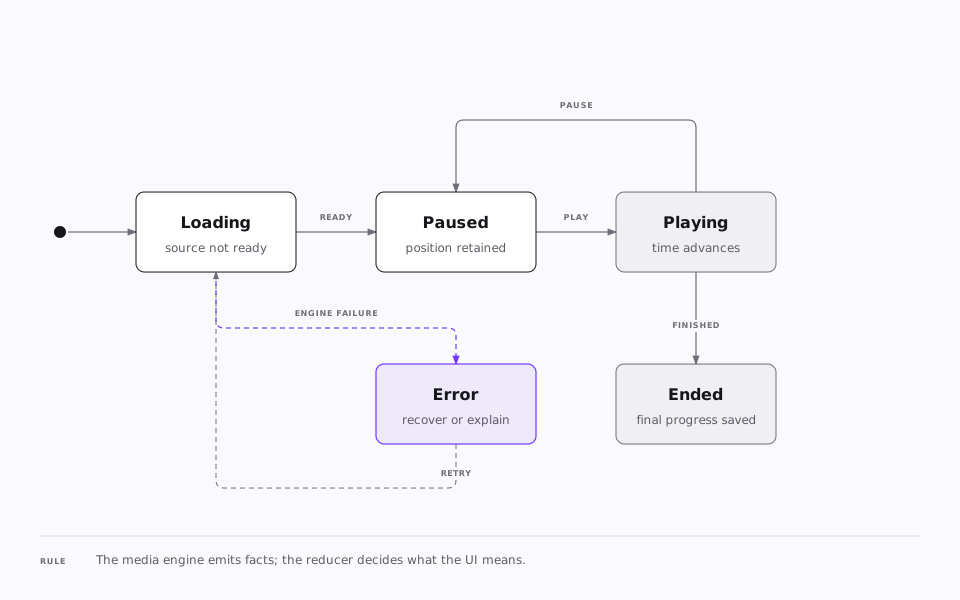
Media events can arrive quickly and in surprising orders. A reducer gives the interface one place to decide what those facts mean.
import type { PlaybackSnapshot } from "./types";

type PlaybackAction =
  | { type: "LOAD" }
  | { duration: number; type: "READY" }
  | { position: number; type: "PLAY" }
  | { position: number; type: "PAUSE" }
  | { type: "END" }
  | { message: string; type: "FAIL" };

export function playerReducer(
  state: PlaybackSnapshot,
  action: PlaybackAction
): PlaybackSnapshot {
  switch (action.type) {
    case "LOAD":
      return { duration: 0, phase: "loading", position: 0 };
    case "READY":
      return { ...state, duration: action.duration, phase: "paused" };
    case "PLAY":
      return { ...state, phase: "playing", position: action.position };
    case "PAUSE":
      return { ...state, phase: "paused", position: action.position };
    case "END":
      return { ...state, phase: "ended", position: state.duration };
    case "FAIL":
      return { ...state, error: action.message, phase: "error" };
  }
}
The reducer should not command the media engine. A tap calls surface.play(). The engine later emits that playback actually started, and only then does the reducer move the UI to playing. This distinction matters because browsers can reject autoplay and mobile playback can be interrupted.
Treat the controls as a product interface
A reliable control layer is more than a row of icons. Build it as stacked responsibilities:
- The media surface renders at the bottom.
- Poster, loading, error, and replay states sit above it.
- A full-surface interaction target reveals or hides the controls.
- The control bar owns play, time, captions, volume, settings, fullscreen, and Picture in Picture.
- Menus and dialogs render above the chrome without remounting the media engine.
Keep the same information hierarchy across platforms, then adapt the interaction. Pointer users can reveal controls on movement. Touch users need a deliberate tap target. Keyboard users need visible focus and a predictable tab order. None of the essential controls should depend on hover.
Scrubbing needs two clocks
During a drag, show the preview position from the gesture. Do not let frequent engine progress events pull the thumb away from the user's finger. On release, seek once and return the UI to engine-driven progress.
That means the progress slider has:
- committed position from the media engine
- temporary position while the user is scrubbing
- one seek command when the gesture ends
This small separation removes much of the jitter that makes custom players feel unfinished.
Auto-hide is a state transition
Hide controls only while playback is active and the user is idle. Keep them visible while paused, focused, scrubbing, navigating a menu, or recovering from an error. Reset the idle timer from explicit interaction events instead of watching broad component state.
Fullscreen and Picture in Picture are capabilities
Do not assume every environment supports every feature. Ask the selected surface what it can do, then render only the available actions.
On web, fullscreen usually belongs to the player container so controls travel with the video. Picture in Picture belongs to the video element. On native, fullscreen may be a method on the video view, a dedicated screen, or a portal-like layer that preserves the same player instance.
Preserving that instance is valuable. Remounting during fullscreen can reset position, captions, quality selection, or buffering. If the layout must move, move the view around the existing engine before creating another engine.
Coordinate more than one player
Feeds and detail screens can leave multiple players mounted. Give the application a tiny media coordinator with one rule: when a player begins, pause the previously active player. Also respond to navigation blur, app backgrounding, audio interruptions, and source changes.
Store progress at meaningful boundaries rather than every frame:
- after a seek
- on pause
- when the app backgrounds
- when the screen loses focus
- at a modest interval during long playback
- on completion
This reduces noisy writes while preserving a useful resume position.
Test behavior, not component snapshots
A cross-platform player needs a small but deliberate matrix:
| Area | iOS | Android | Web |
|---|---|---|---|
| File playback | device and simulator | device and emulator | Chrome, Safari, Firefox |
| Adaptive streaming | HLS | HLS or DASH | native HLS, HLS.js, dash.js |
| Input | touch, hardware controls | touch, back button | pointer, keyboard, touch |
| Lifecycle | interruption, background | interruption, rotation | tab visibility, autoplay policy |
| Display | fullscreen, PiP | fullscreen, PiP | Fullscreen API, browser PiP |
| Accessibility | VoiceOver | TalkBack | screen reader and keyboard |
Test the transitions that break trust: rapid play and pause, dragging before metadata loads, rotating in fullscreen, changing captions mid-playback, switching sources, recovering after a network failure, and opening another player while one is active.
What I would avoid
- A single file full of
Platform.OSbranches. - Exposing native or DOM player objects to every control.
- Treating
isPlaying,isLoading, andhasEndedas unrelated booleans. - Recreating the media engine when controls or fullscreen layout change.
- Assuming a play command means playback started.
- Hiding controls from keyboard or screen-reader users.
- Adding every streaming library before a source actually requires it.
The durable shape is straightforward: shared product behavior, separate platform engines, explicit state, and controls designed around real input and lifecycle constraints. That gives users one coherent player without forcing iOS, Android, and the web to pretend they are the same platform.